
Buying and selling
The coin view: the chart, the trades, your wallets and the ticket that buys and sells from many wallets at once.
The Trading page buys and sells any coin from one or many of your wallets at once. Paste a coin's address and press Load, or open one of your coins from the list the page shows while no coin is open.
The coin view#
- Coin bar
- The coin's name, address and launchpad, its market cap, then Price, Supply, You hold, Outsiders and how far along its curve it is. The arrow at the left goes back to your list of coins.
- Chart
- Candles in price or market cap, in dollars or the chain's own coin, with your average buy and sell marked.
- Activity
- Every trade on the coin as it happens, newest on top. Filter it to Mine, Dev or KOLs. Your own trades read You.
- Holders
- Who holds the coin and how much of it, with Ours and Outsiders to split your wallets from everyone else.
- Our wallets
- Each of your wallets with its balance, its share of the supply and its profit or loss. This launch shows only the wallets of the coin's launch. Tick wallets here to trade from them.
- The rail
- The ticket at the top right, then the tools for the coin: Rules, Clip on buy, Volume bot, KOL sends and Supply moves, each folding open where it sits.
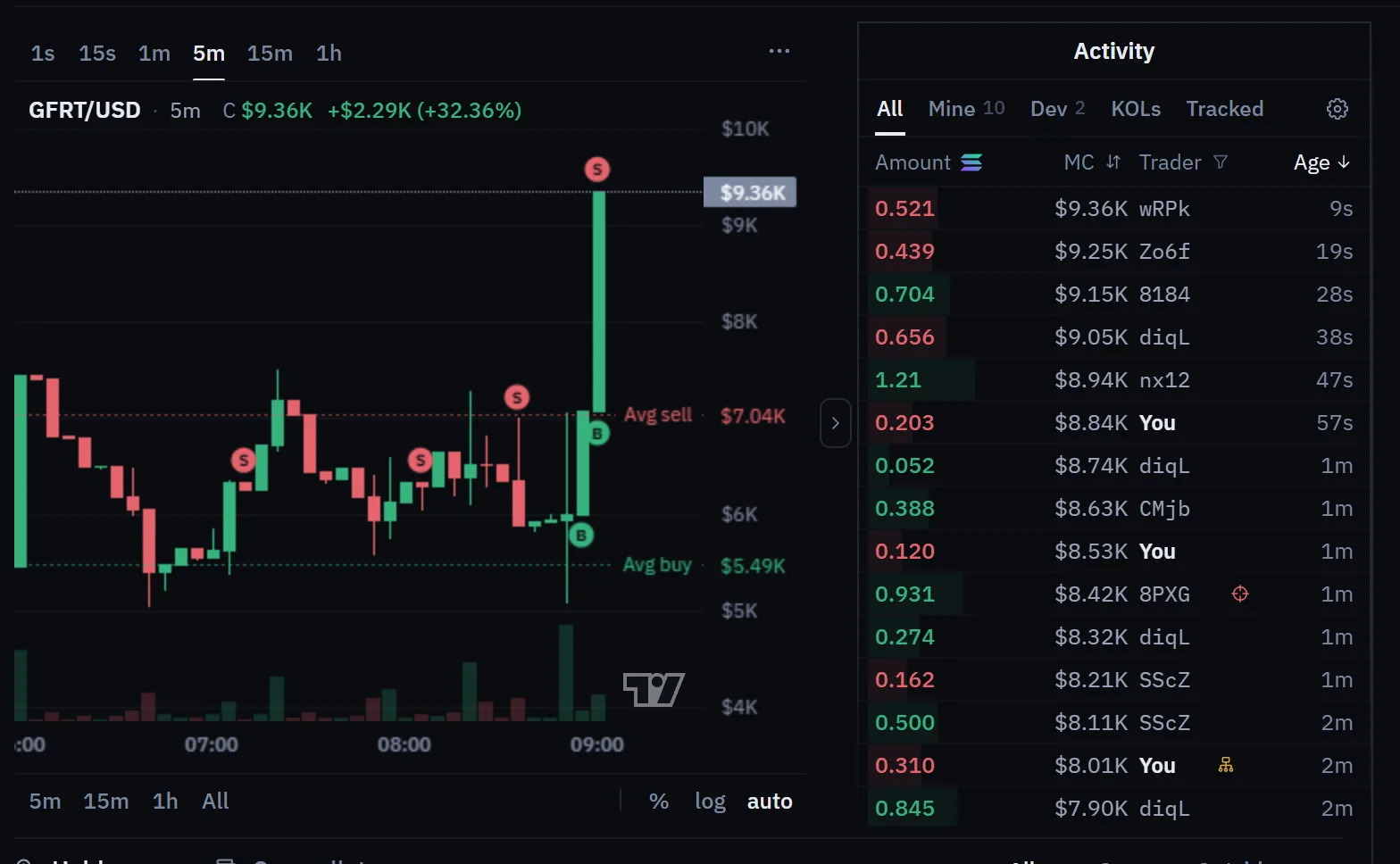
On a phone the view is one column: the coin bar, the chart and the ticket, then tabs for the trades, your wallets, the holders and the tools.
The ticket#
Pick Buy or Sell first, then Market to trade now or Limit to trade at a market cap. Under that sit the presets and the groups of wallets that can trade.
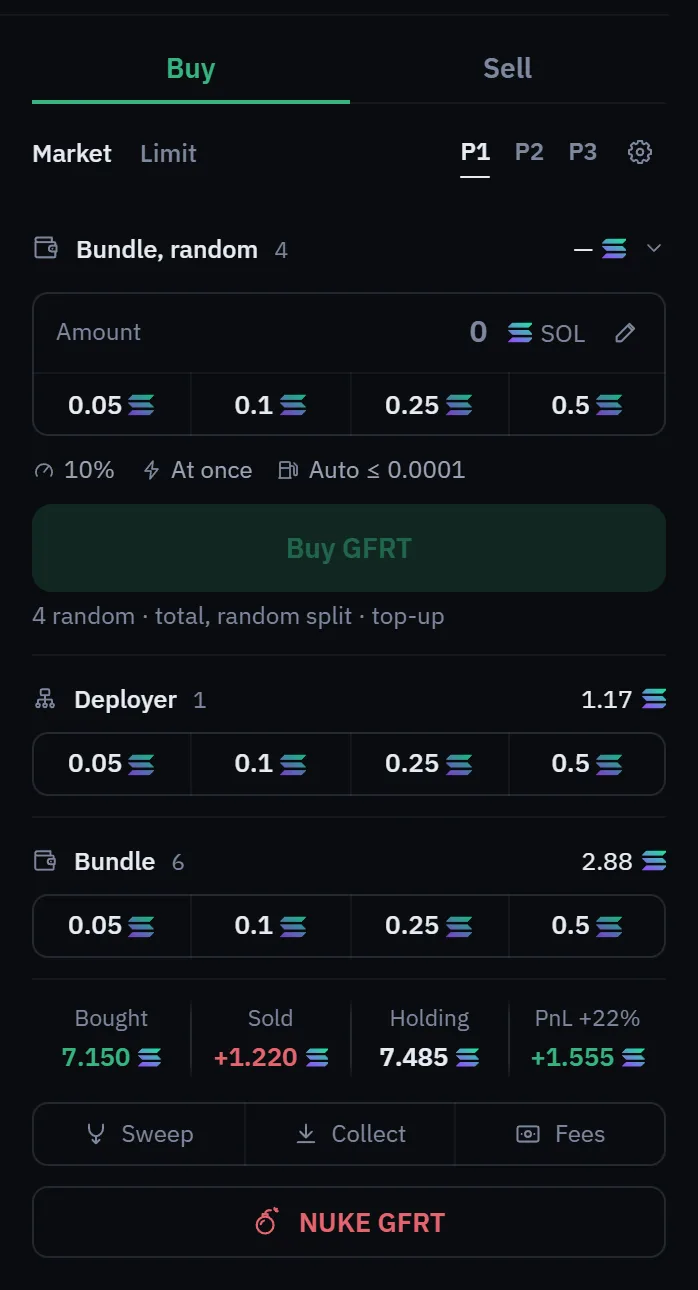
- Presets P1, P2, P3
- Each preset keeps its own buy amounts, sell shares, slippage and speed. Switch with one click, and use the pencil to edit the amounts.
- The gear
- How the rows trade: how an amount is split between a row's wallets, whether short wallets are topped up from your master first, the speed and this preset's slippage.
- Rows
- Developer (the coin's dev wallet) and Bundle on both sides, and Ticked wallets while you have wallets ticked in the list. Each row has its own amount box: a quick amount fills it, the pencil edits the quick amounts, and the row's Buy or Sell button sends it.
- Runs
- A press that uses several wallets is a run. You can press again while one is open: later presses wait their turn, and a strip under the presets shows what is sending and what is next. A run can fill for some wallets and not others; History shows each leg.
Under the groups are your figures on the coin (bought, sold, holding and profit or loss) and three links: Sweep opens Wallets, where Sweep all empties your dev and bundle wallets into your master after asking; Collect opens Rewards to bring idle funds home once you confirm; Fees opens Rewards to claim creator fees.
Limit orders#
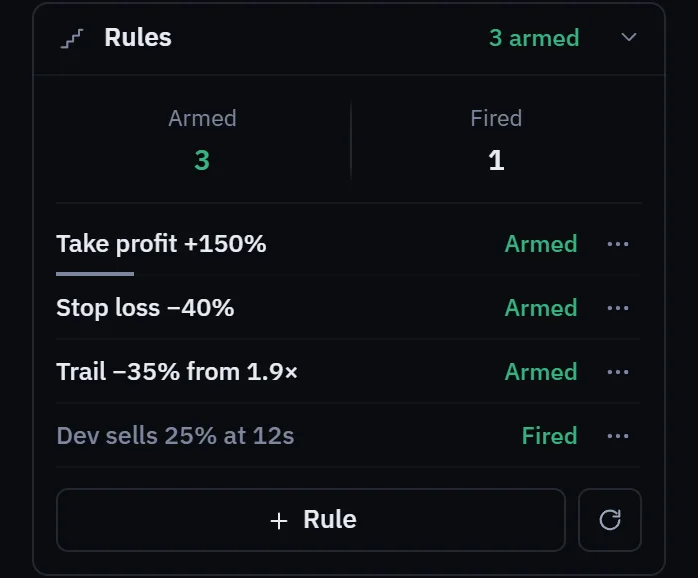
Limit arms a buy or a sell that fires when the coin's market cap reaches the level you set. It is a rule like the ones in Exit rules, so it runs on our servers while you are away and shows under Rules, where you can pause or remove it. It can fire late or at a price that has already moved.
Nuke#
The NUKE button under the ticket carries the coin's ticker, so you can see what it sells. On a Solana or Pons coin it sells your whole position from every wallet that holds it, at once and with no confirmation. It first stops your open runs on that coin, sells with a wider slippage so the sells go through, and also stops your own volume bot and clip on buy on that coin.
Warning. A nuke cannot be undone and sells at whatever price the market gives. Use it when you want out completely. The SOL it brings back stays in the selling wallets until you sweep or collect it.
Launchpad and Pons coins#
Coins from the other launchpads open in the same view, with the same ticket and groups, in the amounts of their own chain.
- Launchpad coins: the Developer and Bundle groups name the launch's own wallets. Limit sells work wherever the coin's market cap can be read, and limit buys where the launchpad allows them; otherwise the Limit tab says so. The NUKE button opens Sell all, which lists every wallet's coins and sends nothing until you press Sell all. If one wallet refuses, the others still go on.
- Pons coins: amounts are in ETH. A coin paired with another token, such as a stablecoin or a stock token, is bought with that pair token, one buy per wallet, and has no Limit tab. Its sells and the Nuke work as on any other coin.
- What each one has: the rail shows only the tools the coin's launchpad supports. Sweep is on every coin, and Fees where the launchpad pays creator fees.
Slippage#
Slippage is the gap you accept between the price you see and the price you get. Each preset has its own buy and sell value, and Settings, under General, holds your default. Too low and a trade fails when the price is moving. Too high and you accept a worse price, especially in a thin market. A failed transaction can still cost a network fee.
Settings behind a trade#
- Fees: an automatic priority fee that follows what recent trades on the coin paid, up to a maximum you set in SOL, or a fixed priority fee on every transaction. Also a tip per trade and the front-running guard.
- Wallets and gas: whether a wallet too low on SOL to pay for its sell is topped up from your master first, or left out of the sell.
- Safety: dust mode caps every run and launch to the number of wallets and the amount per wallet you set, so a mis-click cannot fire a large trade.
- General: your default slippage, and the switch that stops all of your automation at once.
What a trade costs#
Every buy and sell pays Lucky Launch's trade fee, shown on the Fees page, plus the network fee and the venue's own fee. The fee is part of the same transaction, so a trade that fails does not pay it.
Coins on pump.fun, StonkFun, Pons and the other launchpads trade on their own venue. Other Solana coins are routed through a swap service, which can add a small cost of its own.
Next: Positions and history.